

You've recorded a vocal three times, added reverb, raised the fader, and it still sounds muddy. You can hear something's wrong, but you can't yet name the cause or fix it in a repeatable way. That's the gap A Level Music Technology is built to close. It treats you less like someone memorising facts about music and more like an apprentice engineer who has to capture sound, shape it, and explain every decision.
Table of Contents
- What A Level Music Technology Covers and Who It Suits
- Entry Questions Level 2 and Level 3 Students Ask
- Assessment Structure and Component Weightings
- Core Topics From Signal Chain to Room Acoustics
- Setting Up a Home Studio Without Overspending
- How to Run a Recording Project From Session to Final Mix
- Building a Portfolio That Shows More Than a Grade
- How OCAD Tutor Support Maps to Each Requirement
- Confirm Your University Route Before You Apply
What A Level Music Technology Covers and Who It Suits
That muddy mix is a useful starting point. Mud usually means too many sounds fighting in the same low or low-mid frequencies, yet the fix could be microphone position, room reflections, arrangement, or processing. This course teaches you to test each cause in turn instead of guessing.
In plain terms, it's a two-year UK A level where you record, edit, mix, and compose using a digital audio workstation (DAW), the software where you arrange and process audio, and MIDI, data that tells an instrument which notes to play, when, and how hard. You also listen closely to recorded music and write analytically about the production choices you hear.
The national picture
For wider context, the Joint Council for Qualifications 2025 UK A level results recorded 5,418 students taking A level Music, with 61.4% achieving grade C or above, 76.98% grade D or above, and 91.82% grade E or above. Those are Music figures, the closest national benchmark here, not Music Technology-only results. They show a demanding qualification combining practical musicianship, critical listening, technical production, composition, and analysis.
You'll probably suit it if you already make music and want engineering discipline behind your instincts. It also suits learners who understand by building, testing, and revising, and adults moving from production, live sound, or media work into formal study.
Ask yourself two questions. Do you enjoy repeating a take until it works, and can you learn to explain why a sound changed?
If both answers are yes, you're thinking like the course wants you to think.
Entry Questions Level 2 and Level 3 Students Ask
Level 2 covers GCSE-level study, while Level 3 covers A level and equivalent study. If you're moving between creative courses, don't assume every provider applies the same entry rule. Ask these questions before you enrol.
What do I need before starting
Providers set their own requirements, so confirm the GCSE grades they expect. Many ask for grade 4 or above in English and maths. Ask whether you need a prior music qualification or evidence from an earlier route such as GCSE Music. Get the answer in writing, because a general course page may not cover your exact combination of qualifications.
Can I join from a Level 2 or Level 3 creative course
Usually, yes, if the provider accepts your prior study as suitable preparation. A Level 2 learner should ask whether a pass is enough, whether a particular grade is needed, and whether bridging work would help. A Level 3 learner changing direction should ask which recording, composition, or theory skills transfer and which gaps need filling first.
Questions about difficulty, notation, and university
- Is it harder than A level Music: It's different rather than just harder, with less emphasis on score analysis and more sustained production work. The listening exam still matters, so you can't treat writing as an afterthought.
- Do I need to read music or play an instrument: Notation helps you communicate musical ideas, but it isn't the core skill. Playing or singing helps during recording, while DAW fluency, MIDI editing, and careful listening matter most day to day.
- Will it help me reach university: Yes, for production, sound engineering, composition, and related degrees, provided your portfolio evidences recording and mixing. Check each degree's entry requirements separately, because universities may also ask for specific subjects, grades, or interview material.
The safest route is simple. Match your current qualification, your target provider's entry rule, and your intended degree before you commit time or money.
Assessment Structure and Component Weightings
Start with the split, because it tells you where your time goes. Recording and technology-based composition are each usually worth 20%, and most specifications place substantial remaining weight on written listening and analysis, typically 40% for the listening paper described below. Board structures can divide the examination element differently, so treat the table as the pattern to check against your exact specification, not as a promise that every board uses identical titles.
| Component | Weighting | What is assessed | Format |
|---|---|---|---|
| Recording (non-exam assessment) | 20% | Multitrack recording of at least two minutes, including capture, editing and mixing | Coursework submitted to the board |
| Technology-based composition | 20% | Creation, editing and structuring of sounds in a DAW | Coursework submitted to the board |
| Listening and analysis | 40% | Recognising production techniques and critical listening in set and unfamiliar music | Written exam |
| Total | 100% | All components combined under the full board specification | Coursework and exam |
The recording and composition weightings match the Ofqual GCE subject level conditions for Music Technology, which assign 20% to a recording assessment and another 20% to a technology-based composition assessment. The same guidance sets the recording submission at at least two minutes and assesses composition through creating, editing, and structuring sounds.
What each component really rewards
The recording is non-exam assessment, meaning coursework produced over time rather than in an exam hall. You record several parts as separate tracks, edit them, balance them, and submit a final mix. Your tutor marks the work under board rules and external moderation checks that marking.
Composition isn't judged only by whether the final track sounds impressive. Examiners look for control over how sounds are created, edited, layered, and structured. A simple idea handled with clear development can evidence more skill than a crowded track built from untouched loops.
The listening paper asks you to recognise production techniques in set and unfamiliar music. You might identify compression, meaning automatic control of loud and quiet moments, or explain how stereo placement changes the listener's sense of space. That work is analytical, but it's grounded in sounds you've learned to make yourself.
Reading the 20, 20, 40 pattern
The two named coursework components give you 40% that rewards a portfolio built patiently over the course. You can revise, compare versions, and improve your workflow before submission. The exam side rewards a different habit, regular critical listening and concise written explanation under time pressure.
The Department for Education subject content for A level Music Technology specifies competence in sound capture, sequencing and MIDI, audio editing, equalisation, dynamic processing, effects, stereo imaging, synthesis, sampling, automation, and pitch and rhythm correction. Read that list as your skills audit. If a term is unfamiliar now, that's fine, but by submission you should be able to use it and explain its audible effect.
Practical rule: Download your board specification before enrolment and map every component to a piece of work you'll produce in the first term.
Board specifications differ in component titles, exact weights, exam length, and submission rules. Check those details early, especially if you're studying independently, because your equipment, timetable, and exam centre arrangements all follow from them.
Core Topics From Signal Chain to Room Acoustics
Think of a recording like a kitchen brigade working along a line. One station prepares the ingredients, another cooks them, and another seasons and plates the dish. If the first station uses poor ingredients, the last station can't fully rescue the result. Audio works the same way through a signal chain, the ordered path sound takes from source to microphone, interface, DAW, processing, and speakers.

Capture the sound cleanly
Capture covers microphone choice, placement, input level, and the room itself. A live room, meaning a space where sound reflects noticeably from surfaces, shapes every take before processing begins. You need to understand pre-delay, the short gap before reverberation begins, early reflections, the first echoes bouncing from nearby surfaces, and reverberation time, how long sound takes to fade away.
Move a microphone a few centimetres and the balance of direct sound and room sound changes. That's why experienced engineers fix placement before reaching for plugins, the small software tools inside a DAW that process sound.
Build and shape the material
The build stage covers sequencing, MIDI editing, audio editing, synthesis, sampling, and pitch and rhythm correction. Sequencing means arranging musical events in time. Synthesis means generating sound electronically, while sampling means reusing and reshaping recorded sound. If timing terms still feel shaky, Vocuno's guide to finding time signatures can help you connect what you hear to beats in a bar before you quantise, or snap, notes to a grid.
Shape covers equalisation, dynamic processing, effects, stereo imaging, and automation. Equalisation (EQ) adjusts selected frequencies. Dynamic processing controls changes in loudness. Stereo imaging concerns how wide or narrow sounds feel between left and right speakers, and automation records changes over time, such as a vocal rising slightly in a chorus. Learners who want supporting theory alongside studio practice can compare online music theory courses with the topics in their specification.
Diagnose before you process
Say a vocal sounds boxy, as if the singer is inside a cardboard container. Your first instinct might be to cut low-mid frequencies with EQ. Pause there. Check how close the singer was to the microphone, because close placement can exaggerate low frequencies. Then check nearby walls, because early reflections may be thickening the sound.
An unclear mix can also come from frequency masking, where one sound hides another in the same frequency area, excessive dynamics, or an effect that doesn't suit the source. Each cause needs a different fix. Change one thing, listen, compare, and write down why you kept or rejected the change.
Presets aren't answers. They're starting points written for somebody else's recording. For every project, document your signal chain, microphone position, processing decisions, and before and after listening evidence. That record turns trial and error into engineering judgement you can repeat.
Setting Up a Home Studio Without Overspending
You don't need a professional room to begin, but every assessment task has a real equipment cost. Price the task, not the dream studio. Start with the lowest tier that lets you complete assessable work reliably, then upgrade only when a specific coursework gap appears.
| Setup tier | Hardware | Software | Tasks it supports |
|---|---|---|---|
| Minimum | Laptop or PC, headphones, USB audio interface with one input, MIDI keyboard optional | Free or trial DAW and free plugins | MIDI composition, listening analysis, editing borrowed recordings |
| Sensible | Laptop, two-input audio interface, one condenser or dynamic microphone, closed-back headphones, nearfield monitors or good headphones | Paid or education-licensed DAW with bundled plugins | Multitrack recording of acoustic instruments and vocals in a treated room |
| Professional | Desktop, multi-channel interface, two or more microphones, acoustic treatment, studio monitors | Full DAW, sample libraries and third-party plugins | Multi-instrument sessions, detailed room work and advanced sound design |
An audio interface converts microphone and instrument signals into digital audio your computer can record. Closed-back headphones reduce sound leaking into the microphone during recording. Nearfield monitors are small speakers designed for listening at close range while mixing.
The hidden cost of online study
The Wellington College A level Music Technology subject information outlines a qualification built around recording, technology-based composition, listening and analysis, and practical editing and mixing. Those tasks need more than a laptop and musical ability. Online doesn't automatically mean accessible, because practical assessment can shift costs from an institution to your household, including reliable internet, a current device, storage, microphones, and a quiet place to work.
Free routes can reduce the first bill. GarageBand is available on Mac, and Cakewalk by BandLab has offered a Windows route. Check current availability, file compatibility, and whether your exam board and provider accept the software before building coursework in it.
Make a small room work
For an acoustic instrument or vocal, choose the quietest time you can. Add soft furnishings such as bedding, curtains, or cushions to reduce reflections. Keep the microphone at a fixed distance and note that distance in your production log, so your next session can repeat the setup.
- Borrow before buying: Ask schools, colleges, libraries, youth music services, and community studios about interfaces, microphones, and MIDI keyboards.
- Use low-equipment tasks well: MIDI composition, listening analysis, arrangement planning, and editing supplied recordings need little more than a computer and headphones.
- Plan for access: SEND learners may need an accessible interface, larger controls, captions, or demonstrations that can be paused and replayed at their own pace.
Buy in sequence. Secure the working minimum, finish a short test recording, then spend on the weakness that test reveals. That order protects both your budget and your marks.
How to Run a Recording Project From Session to Final Mix
Order matters because most lost marks come from trying to fix audio before you've judged it fairly. A controlled session gives you clean material, reversible edits, and evidence that each processing choice solved a named problem.
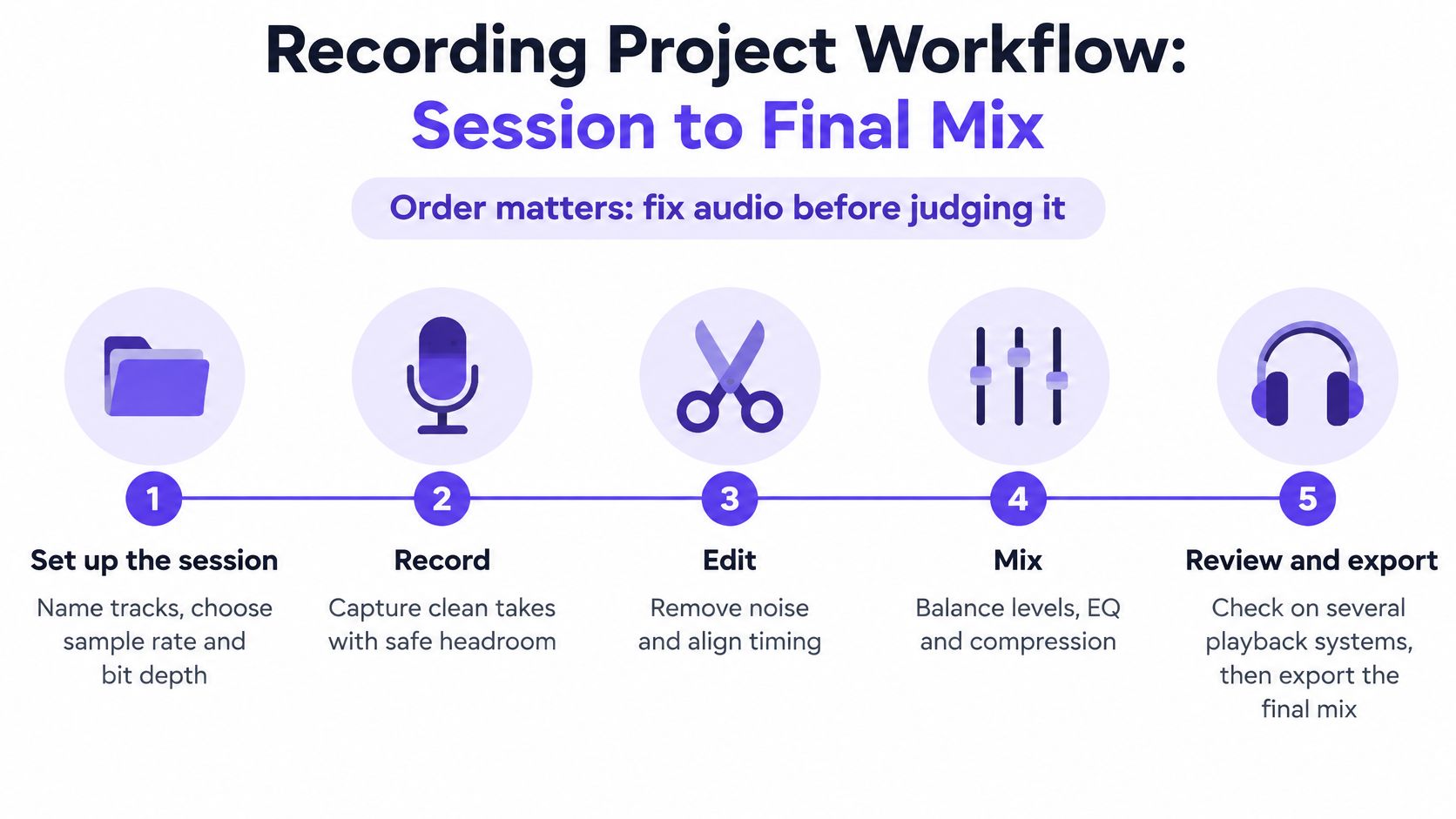
Run the eight-step checklist
- Set up the session: Name tracks clearly, choose the sample rate and bit depth, and set gain structure before recording. Sample rate and bit depth describe how finely digital audio captures sound.
- Capture clean audio: Leave headroom, spare level below distortion, check phase on multi-microphone sources, and keep several usable takes. Phase problems happen when microphones capture the same sound at slightly different times, thinning the result.
- Edit non-destructively: Correct timing, remove noise, and arrange takes without permanently altering the original files. Keep the source recordings in the project so you can undo decisions.
- Evaluate the raw tracks: Listen solo to spot faults, then listen in context to judge balance. Write down the problem before selecting a tool.
- Apply corrective processing: Use EQ and dynamics only after evaluation. Small, purposeful changes are easier to justify than a long chain of presets.
- Automate the mix: Adjust level, pan, and spatial effects such as reverb sends across the timeline. Pan places a sound between left and right.
- Run quality control: Check on headphones and speakers for clipping, harshness, imbalance, and mono compatibility, meaning the mix still makes sense when left and right channels combine.
- Export and document: Save versioned sessions, export stems and the final mix, and add concise production notes. Stems are grouped audio files, such as all drums or all vocals, exported separately.
Keep MIDI and audio distinct
MIDI stores performance instructions such as note, timing, velocity, and controller data. You can change the instrument sound later because MIDI isn't the sound itself. Recorded audio stores a waveform, so it needs waveform editing and processing. Treat the two as complementary, MIDI for flexible composition and audio for captured performance.
A technology-based composition needs the same discipline. Save dated versions, name your sound choices, and explain how the structure developed. Learners comparing practical music routes may also look at the RSL Level 3 Certificate for Music Practitioners to see how another Level 3 pathway organises performance and production evidence.
Don't ask whether a mix sounds impressive yet. Ask whether every change solved a problem you can name and hear.
Run the checklist before every submission. It protects you from the common failure mode, a polished bounce built on disorganised sessions that nobody can revisit or moderate with confidence.
Building a Portfolio That Shows More Than a Grade
A polished final mix can earn strong marks and still tell an employer or university very little about how you work. It doesn't show whether you organised sessions, managed versions, listened critically, cleared samples, or responded to feedback. Build the evidence while you make the music, not after the deadline.
Keep evidence for each activity
- Recording: Keep versioned DAW sessions, exported stems, microphone notes, before and after mixes, and the final mix.
- Composition: Keep arrangement drafts, MIDI files, sound design notes, sample licences, and short explanations of structural choices.
- Listening and analysis: Keep annotated listening notes that connect a technique you hear to its effect on the listener.
- Reflection: Keep a production log with dates, decisions, problems, feedback, and what changed in the next version.
That structure makes workflow visible. It also gives home-educated students and career changers a credible progression story beyond a single grade, because a reader can trace the development from first capture to final export.
The Creative Industries Policy and Evidence Centre music skills audit found that 65% of music employers with upskilling needs expected to require new digital skills over the following three to five years. Your portfolio should therefore evidence digital workflow, not only musical taste. File management, version control, accessible presentation, and clear technical writing all count as professional skills.
Handle samples and AI material openly
Keep a licence record for every sample, loop, preset, or library sound you use. Note where it came from, what the licence allows, and where it appears in the track. If you use AI-assisted material where your board permits it, declare the tool and your own editing contribution. Ethical clarity protects your coursework and any later public release.
Present each major project on one page. State the brief, the equipment and software, three key decisions, one problem you solved, and one audio example. Link to the session evidence rather than burying a reader in files. A university tutor or entry-level employer should understand your process within minutes.
Your grade certifies the standard you reached. Your portfolio shows how reliably you can reach it again.
How OCAD Tutor Support Maps to Each Requirement
OCAD supports the main requirements through live tutor contact, an online studio, and portfolio feedback. That isn't the whole enrolment decision, though. You still need to confirm equipment guidance, the exact board specification, software expectations, and exam timing directly before you start.
OCAD delivers A Level Music study online with one-to-one or group tuition through Microsoft Teams for Education. Its online studio holds units, assignments, video tutorials, and a portfolio workspace. Scheduling is flexible across time zones and commitments, which can help if you're balancing study with work, caring responsibilities, or home education.
| Course requirement | What you need | How OCAD supports it | What to confirm |
|---|---|---|---|
| Recording coursework | Audio interface, microphones, quiet room, feedback on takes | One-to-one tuition and live sessions via Microsoft Teams for Education | Ask for the equipment list for your first recording unit |
| Technology-based composition | DAW access, drafts, structure feedback | Online studio units, assignments and video tutorials | Confirm accepted DAWs and who pays for licences |
| Listening and analysis | Regular listening and exam-style writing | Group lessons and online studio materials | Confirm exam paper format, board, and entry dates |
| Portfolio evidence | Versioned sessions, production log, reflective commentary | Portfolio workspace and tutor feedback on iterative drafts | Ask for the board portfolio standard and file format |
| Timetable and access | Study time around work or family, SEND adjustments | Flexible scheduling and SEND-specific pathways | Compare live session times with coursework and exam dates |
How feedback should work in practice
Submit a draft mix with your production log, not just an audio file. Your tutor can then comment on capture, balance, processing, and the reasoning in your notes. Revise the mix, save it as a new version, and resubmit. Keeping every draft gives you development evidence and stops feedback from becoming a vague conversation you can't act on later.
SEND learners should discuss adapted pacing, accessible materials, and assessment adjustments at the first conversation. Don't wait until coursework pressure builds. Ask who coordinates support, how live sessions are recorded or summarised, and how deadlines flex if your access needs change.
On your first adviser call, ask five direct questions. Which specification will I follow, what equipment must I own, which DAW should I use, how are exams entered, and how often will a tutor review draft audio? Clear answers now prevent expensive surprises later.
Confirm Your University Route Before You Apply
A music-related degree isn't automatically eligible for student finance just because it sounds creative or sits in a music department. Check the qualification, the provider, and your personal eligibility together before you build an application around a course.
The Student Finance England guidance on who qualifies lists BA and BSc first degrees, foundation degrees, HNCs, HNDs, Certificates of Higher Education, Diplomas of Higher Education, integrated master's degrees, and approved Level 4 or 5 Higher Technical Qualifications as potentially eligible courses. Eligibility also depends on the provider, previous higher education study, age, nationality, and residency status.
Separate tuition support from living costs
A Tuition Fee Loan is paid toward course fees. Living-cost support is a separate calculation. Don't merge the two when you compare universities, because a course with an eligible tuition fee still needs a realistic budget for rent, travel, equipment, and software.
| Academic year | Maximum tuition fee loan | Status |
|---|---|---|
| 2025-26 | £9,535 | Published maximum |
| 2026-27 | £9,790 | Published maximum, not guaranteed |
The GOV.UK guide for new full-time students gives £9,790 for 2026-27 and £9,535 for 2025-26 as the maximum Tuition Fee Loan for full-time partly practical subjects, including creative and performing arts. It's a ceiling linked to the university's approved fee and your eligibility, not a guaranteed payment.
Choose the route, then protect the evidence
After A Level Music Technology, plausible routes include music production, sound engineering, composition, media audio, and degrees in music technology or a related field. Read the portfolio request closely. One university may want finished tracks, another may want session evidence, written analysis, or a spoken explanation of your process.
Your application is safer when the course, finance, and portfolio requirements all point in the same direction.
Run these checks in order.
- Shortlist named courses: Record the exact qualification title and provider.
- Confirm finance eligibility: Check the course type and your own circumstances.
- Check the current fee: Use the fee for the academic year you'll start.
- Read portfolio requirements: Note file types, track length, and written evidence.
- Ask your tutor now: Identify which sessions, stems, logs, and drafts to preserve for application season.
That final question matters while you're still studying. Evidence you save routinely is easy to present. Evidence you try to reconstruct a year later rarely shows your best engineering judgement.
If you're ready to turn home recordings into assessed A Level Music Technology coursework with structured tutor feedback, explore the online music routes at The Online College of Art & Design (OCAD). Speak to the team about your current Level 2 or Level 3 study, your home studio setup, and the university route you want your portfolio to support.