

Are you choosing a Functional Skills ICT Level 2 online course because you need digital confidence, or because you hope it will take you directly to university? Those are related goals, but they aren't the same outcome. Creative students often discover too late that a digital qualification may strengthen an application without earning UCAS Tariff points, while a portfolio and a suitable Level 3 qualification usually do the heavier work in creative admissions.
The useful question is therefore not just “What software does the course teach?” Ask instead, “What can I do with this qualification next, and will I be able to prove the skills I've gained?”
Table of Contents
- What This Qualification Actually Is
- Understanding the Syllabus and Assessment Units
- How the Course Is Delivered Online
- Pass Rates and What They Mean for You
- Progression Routes to University and Level 3 Study
- Practical Tips for Creative Students Passing the Course
- Frequently Asked Questions
What This Qualification Actually Is
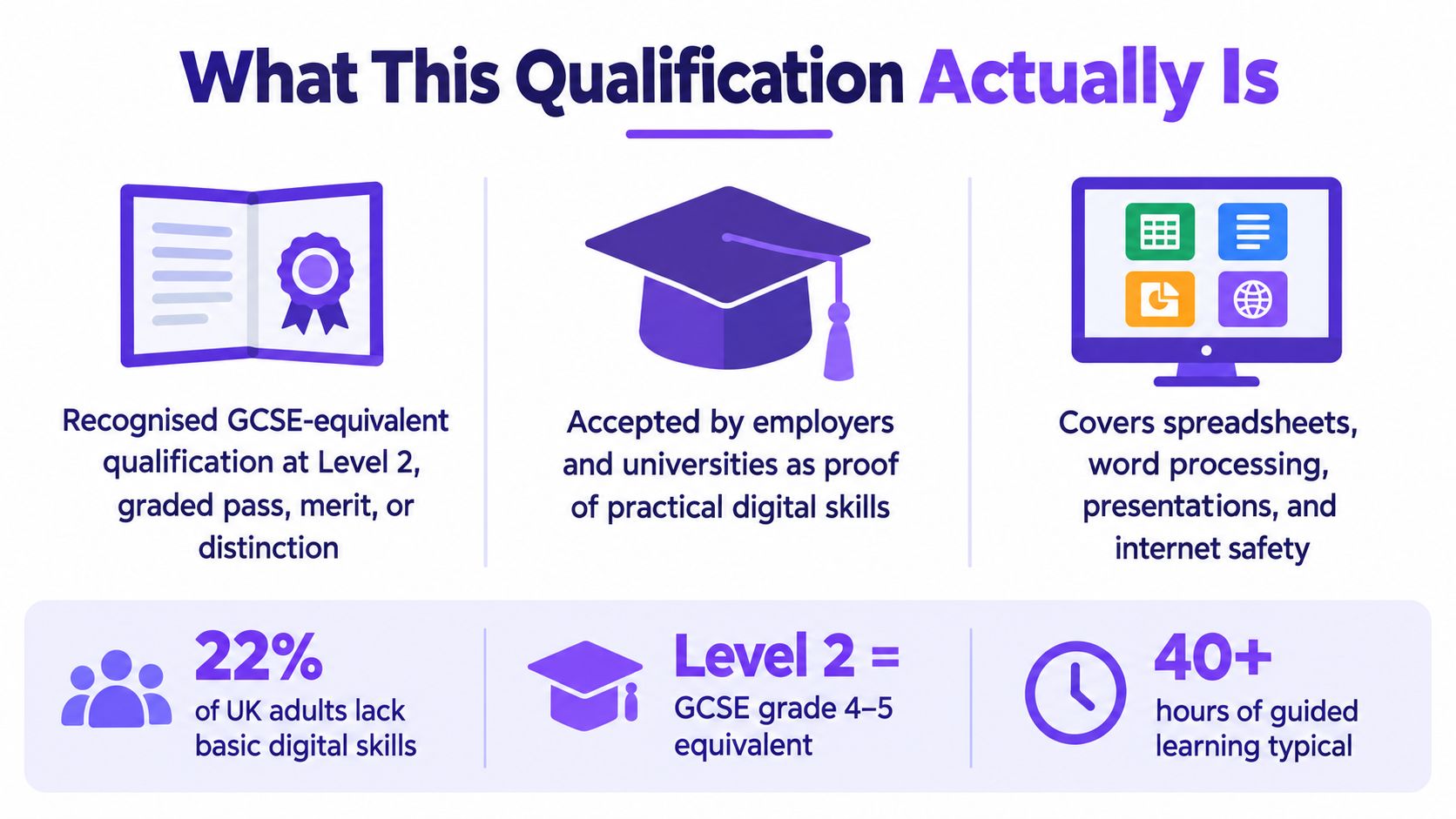
Functional Skills ICT Level 2 is a regulated qualification in England, rather than a commercial course that only provides a certificate of attendance. Functional Skills qualifications are available in English, mathematics and ICT, within a framework that includes Entry Level, Level 1 and Level 2. The qualification therefore sits within recognised post-16 provision, although its value for your next step depends on the requirements of the university, college, employer or training provider you choose.
For a creative student, the distinction is practical. A short course may teach you to format a document or create a presentation. A regulated Functional Skills qualification requires you to demonstrate that you can apply digital skills to ordinary tasks, handle information and solve problems. Level 2 is commonly treated as a GCSE-equivalent benchmark for progression and employment, but that comparison does not mean every university will accept it in place of a particular GCSE or Level 3 qualification.
The qualification can strengthen an application, but it is not a guaranteed route into a creative degree. It does not automatically provide UCAS Tariff points or secure university admission. Admissions teams set their own entry rules, and creative courses commonly assess your portfolio alongside your academic or vocational qualifications. Photography, graphic design, fine art, fashion, film and music applicants should therefore treat ICT as supporting evidence, not as a substitute for creative work.
The wider market figures provide useful context. In the 2022 to 2023 academic year, the overall number of Functional Skills certificates rose by 9%, equal to 27,700 additional certificates compared with the previous academic year, while ICT certificates fell by 3,700. The published Functional Skills certificate statistics show that the qualification family remains widely used, while ICT is a smaller and more changeable strand than English or mathematics.
What the qualification can and cannot do
A Level 2 ICT certificate can show employers and education providers that you can use digital tools, organise information and deal with practical problems. It may support applications for work, further education and some college routes where digital competence is part of the entry requirement.
Its best role is as a progression foundation. A learner who can organise folders, protect files, communicate professionally online and troubleshoot a basic problem begins Level 3 study with fewer avoidable barriers. Before selecting a provider, read this guide to whether completing Functional Skills online suits your circumstances.
Understanding the Syllabus and Assessment Units
A strong course should connect its content to tasks you'll perform. The three core areas are commonly described as Using Standard ICT Applications, Working with Data, and Using and Developing ICT Systems. They are not three disconnected software modules. Together, they test whether you can choose and apply digital methods for a purpose.
Using standard ICT applications
This area may involve documents, presentations, spreadsheets and communication tools. The important question isn't whether you can find a particular button. It's whether you can produce a suitable result.
For example, a creative learner might need to:
- Prepare information clearly: Create a structured project brief, format headings consistently and export a document in an appropriate format.
- Build a presentation: Combine text, images and layout choices so that the audience can follow the intended message.
- Manage files: Use sensible folder structures, clear file names and suitable storage locations instead of saving every version to the desktop.
- Collaborate online: Share a working file, control access and make useful changes in a cloud-based environment.
Working with data
Data work involves more than entering figures into cells. You may need to organise information, identify patterns, use formulas or present results so another person can understand them.
That has a direct creative application. A photographer could organise a list of clients and project dates. A designer could track versions, deadlines and production requirements. A musician could use a structured spreadsheet to plan recording sessions, contributors and deliverables. The qualification rewards accurate, purposeful use of information rather than decoration for its own sake.
Using and developing ICT systems
This area brings in devices, settings, connectivity, security and problem-solving. The UK Essential Digital Skills standards describe Level 2 as appropriate for people who are already confident users and need to apply problem-solving independently in work, study and everyday situations. The standards include maintaining devices, using cloud-based tools and apps, and managing secure online payments. The government's Essential Digital Skills standards show why a modern ICT course should go beyond a list of office applications.
That means a learner might need to decide what to do when a file won't open, a device needs an update, a shared document has the wrong permissions or an online transaction looks unsafe. These are judgement tasks. You're expected to identify the problem, choose a sensible action and explain or demonstrate the result.
A basic computer literacy course might teach isolated procedures. Level 2 Functional Skills ICT focuses on transfer, which means applying a skill in a new but realistic situation. That's the part that can improve your confidence in a creative workplace, where software, file types and production problems rarely arrive in exactly the order shown in a tutorial.
How the Course Is Delivered Online
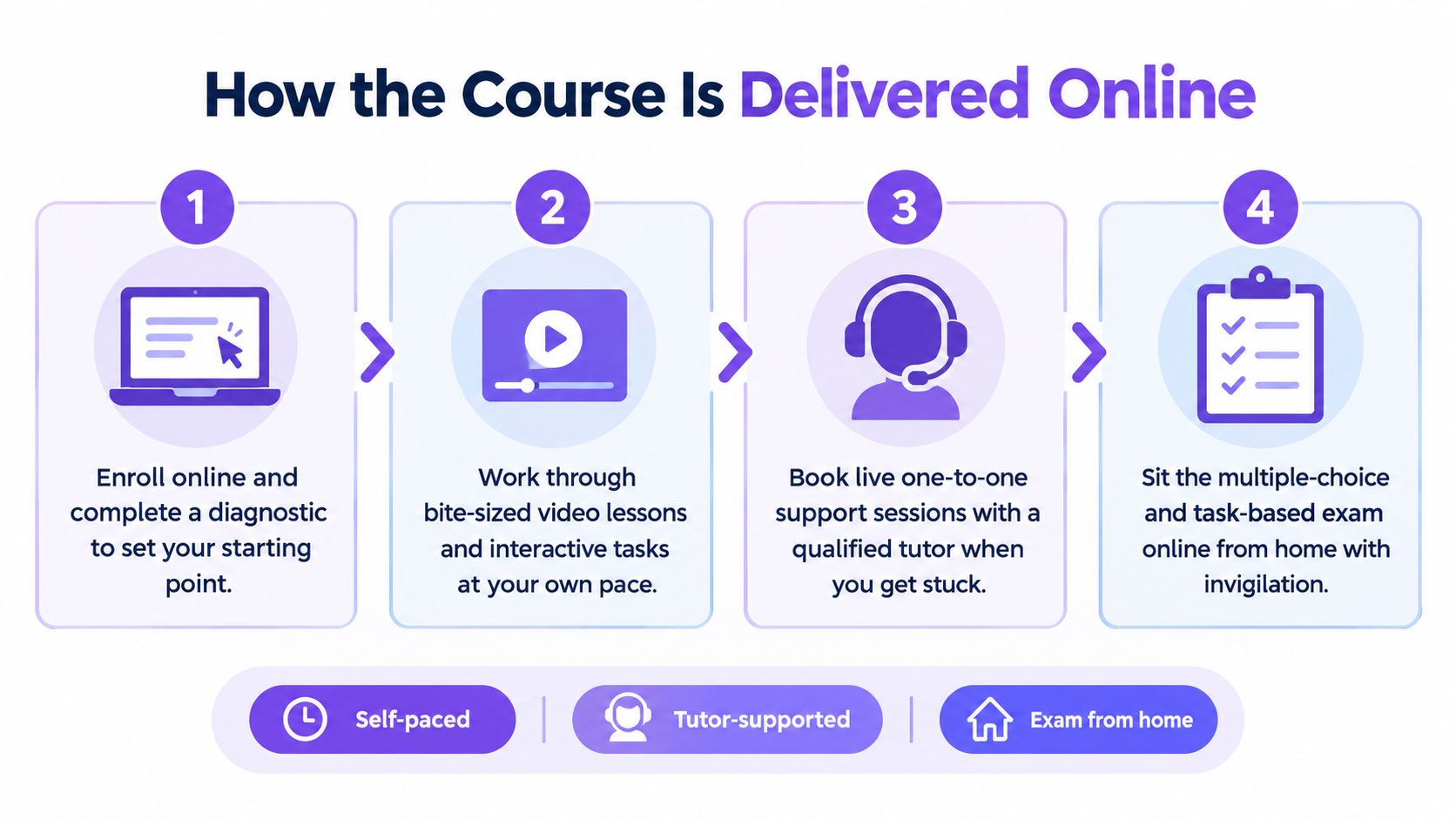
Online delivery works best when it combines flexibility with accountability. A purely self-paced course can be convenient, but learners may spend too long practising tasks they already understand while avoiding the areas they find difficult. A traditional classroom can provide immediate support, but fixed travel and lesson times don't suit every adult, home-educated student or learner with additional needs.
A blended online model sits between those extremes. One-to-one sessions and group lessons can provide live guidance, while self-study units allow you to revisit a demonstration, pause a video or practise a task when your schedule permits. Live tuition through Microsoft Teams for Education can also make it easier to ask why a method works, rather than just copy a sequence of clicks.
Compare the two common models
| Delivery model | What it offers | Where you need to be careful |
|---|---|---|
| Self-paced only | You can study around work, caring responsibilities or other lessons. | You may lack feedback when your approach is inefficient or incorrect. |
| Live and self-study combined | You get structured lessons, independent practice and access to tutor support. | You still need to plan regular practice between sessions. |
| Classroom-only provision | You can ask questions immediately and work alongside other learners. | Travel, timetable and location may limit access. |
A useful programme should begin with an initial assessment or diagnostic activity. That gives you and your tutor a starting point, whether you need help with file management, spreadsheets, online safety or interpreting task instructions. SEND learners may also need adapted pacing, additional explanations or a different balance between group and individual tuition.
The assessment format affects how you should practise. Official criteria state that Level 1 and Level 2 assessments must last a minimum of two hours and a maximum of three hours, and that the qualification is competence-based. The NCFE Functional Skills ICT factsheet sets out those assessment requirements.
A course is genuinely flexible only if it gives you enough structure to keep moving.
When comparing providers, ask whether you'll receive marked practice tasks, tutor feedback, realistic mock assessments and clear information about invigilation. You can also use a course platform for creators to understand the wider features that online learning platforms may provide, such as hosted lessons, learner activity and collaboration tools. For a more focused comparison of study formats, see these online Functional Skills courses.
Pass Rates and What They Mean for You
Will a pass help you reach university or find creative work? It can strengthen your starting point, but the result needs context. NCFE's data for 2020 to 2021 recorded a 70% pass rate for Level 2 ICT in one measure and 47% in another. A Level 2 Functional Skills IT course page citing NCFE data presents these figures alongside the different assessment measures and the unusual teacher-assessed or adapted conditions during the pandemic period.
Those figures do not set your personal odds of passing. They show that assessment conditions, preparation and support can influence outcomes. A certificate can support an application, but it cannot replace the practical ability to complete digital tasks accurately. Passive lesson watching rarely builds that ability.
What improves your preparation
Practise the actions the assessment requires: read the task, choose a suitable tool, complete the work, then check that the result serves its purpose. Treat each activity like a small client brief. The finished file matters, but so does the process used to produce it.
- Practise one complete task: Create the document, save it correctly, review it and submit it in the required format. Do not stop after learning one function.
- Explain your decisions: Ask why you chose a folder, formula, sharing setting or security measure. This connects technical steps with workplace judgement.
- Use timed practice: Complete realistic activities without constantly checking answers. Build the organisation needed for the two-to-three-hour assessment window.
- Review errors by type: Separate knowledge gaps from careless mistakes, poor file management and misunderstood instructions. Each needs a different remedy.
The qualifications market report records 234,585 Level 2 certificates in one year, followed by 178,560, 113,560, 114,970 and 115,190 in subsequent years. The same government market reporting shows that certificate volumes vary, while Level 2 remains a recognised achievement threshold.
For employment, the result gives an organisation evidence that you have met a regulated standard. It does not prove expertise in every creative application. It can support the practical claim that you handle digital information, complete tasks accurately and respond to common problems.
Progression Routes to University and Level 3 Study
Can Functional Skills ICT Level 2 get you into university? Not by earning UCAS Tariff points. UCAS states that its Tariff applies to Level 3 and SCQF Level 6 qualifications, not Level 2 qualifications such as GCSEs. UCAS guidance on Tariff points makes that distinction clear.
That doesn't make Level 2 useless. It means you need to understand its role in the route. For many creative learners, the sensible progression is:
- Complete a suitable Level 2 qualification, which may help establish a GCSE-equivalent academic foundation and improve digital readiness.
- Move into Level 3 study, such as a Foundation Diploma, A Levels, a vocational diploma or an Access course, depending on the institution and subject.
- Build a strong portfolio, with evidence of development rather than only polished final pieces.
- Check each university's entry requirements, because institutions set their own combinations of qualifications, grades and portfolio expectations.
A Level 2 ICT qualification can help with stage three indirectly. Digital portfolio work involves file naming, image resizing, cloud storage, document preparation, presentation design and reliable communication. Those skills won't replace artistic judgement, but they can make it easier to document and present your judgement.
Why the portfolio remains central
Creative admissions teams often want to see how your ideas developed. Loughborough University states that shortlisted applicants must provide a digital portfolio and that it should show stages including initial research, drawing, experimentation and final realisation. Loughborough's creative portfolio guidance demonstrates that a portfolio is an admissions document with a process behind it, not just a gallery of finished images.
For a student moving from Level 2 into Level 3 Art, Design, Media, Photography or Music, this creates a practical target. Use your digital study to become organised enough to preserve sketches, drafts, contact sheets, notes, edits and reflections. Then use Level 3 creative study to develop the ideas and technical quality that universities assess.
If mathematics is also part of your entry plan, consider the separate online Functional Skills Maths route and check whether the college or university requires a particular subject combination.
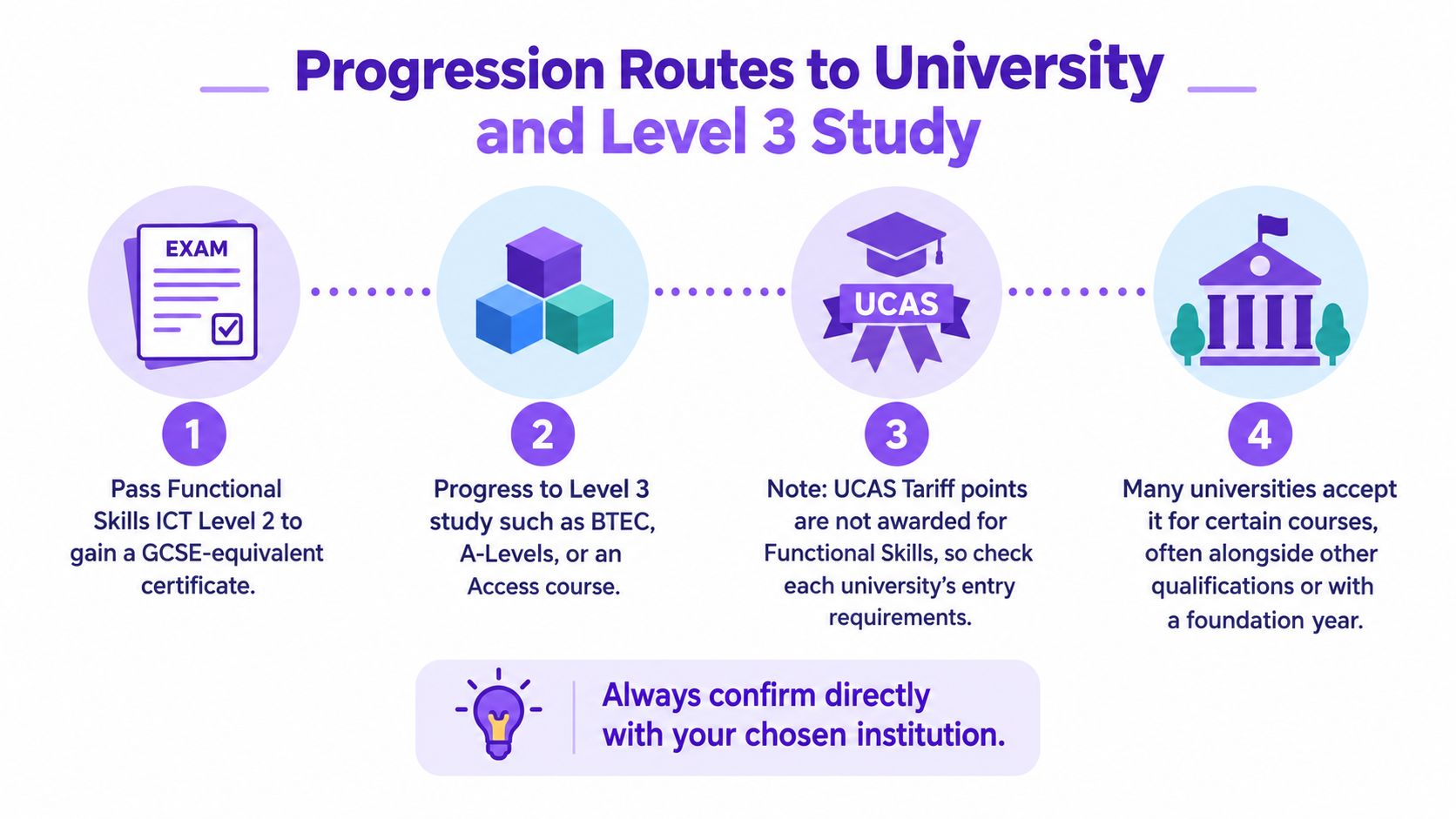
The most accurate answer is therefore conditional. Functional Skills ICT Level 2 may support a university route, but it normally works alongside Level 3 study and a portfolio rather than replacing them. Always ask your chosen institution whether it accepts the qualification for your intended course and whether it expects additional English, mathematics, subject or portfolio evidence.
Practical Tips for Creative Students Passing the Course
Creative learners often underestimate how closely ICT skills connect to their subject. A portfolio may begin as an idea in a sketchbook, but it becomes a digital project involving scans, photographs, filenames, revisions, cloud storage and presentation. Treating those tasks as part of your creative practice makes the qualification feel more relevant and gives you more opportunities to practise.
Build a working system from the beginning
Create a clear folder structure for your course. You might separate research, source files, working documents, exports, feedback and final submissions. Use descriptive filenames that include the project or task, rather than relying on names such as “finalfinal2”.
Practise with tools that reflect real creative workflows:
- Cloud collaboration: Share a document, check permissions and respond to feedback without losing the original.
- Spreadsheets: Track project stages, deadlines, equipment or image selections.
- Document production: Prepare a short artist statement, project proposal or client-facing brief.
- Online safety: Check links, protect accounts and pause before entering payment or personal information.
- Troubleshooting: Work through a missing file, incompatible format or unexpected software behaviour methodically.
The government's digital-skills research reports that 37% of adults identify self-teaching as the most common way they improve their digital skills. The DSIT public engagement survey makes the case for combining independent practice with clear guidance. Self-teaching can help you explore, but tutor feedback can reveal an inefficient process before it becomes a habit.
Keep a portfolio log
Don't wait until Level 3 to record your development. Save a small selection of early work, notes about decisions, tutor feedback and revised versions. You're not trying to create a finished university portfolio during an ICT course. You're building the digital discipline that will make later portfolio preparation much easier.
Ask your tutor to review how you solved a problem, not just whether the final file looks correct. A beautifully presented document with poor file control, unclear sources or unsafe sharing settings still shows weaknesses that can affect workplace tasks.
Finally, practise in realistic blocks. Because the official assessment can last between two and three hours, complete occasional sessions in which you read instructions, manage files, finish related tasks and check your work without constant assistance. This helps you develop concentration and recover calmly when something doesn't work first time.
Frequently Asked Questions
Is Functional Skills ICT Level 2 still available?
The government says Functional Skills ICT qualifications were replaced by digital Functional Skills qualifications from August 2023. However, Level 2 ICT Functional Skills qualifications remained on the funded list from 1 August 2022 for adults with low digital skills during the transition. Ask the provider whether you're enrolling on a legacy ICT qualification or a current digital Functional Skills route. The adult skills guidance on low digital skills explains the distinction.
Can it replace a GCSE grade 4 or above?
It may be accepted as a comparable Level 2 qualification for some college or training routes, but acceptance isn't universal. Check the exact entry requirements for your chosen course.
What if I fail the assessment?
Ask your provider about resits, feedback and any additional assessment costs before enrolment. Use the first attempt diagnostically, then practise the specific skills that caused difficulty.
Does it meet the English and maths requirement for an apprenticeship?
No. A Functional Skills ICT qualification doesn't automatically satisfy an apprenticeship's English or maths requirement. Check the apprenticeship standard and the training provider's conditions.
A typical creative route might begin with a learner completing Level 2 ICT to strengthen digital organisation, then moving into a Level 3 Foundation Diploma in Art, Design and Media. During that Level 3 course, the learner develops research, experimentation and final outcomes, organises the work digitally and applies to university with a portfolio that shows the full process. The ICT qualification supports the journey, but the Level 3 achievement, portfolio and institution-specific requirements determine the next decision.
The Online College of Art & Design (OCAD) offers online Functional Skills courses alongside tutor-led Level 3 creative pathways, portfolio development and specialist support for learners planning further study. Visit The Online College of Art & Design (OCAD) to compare the available routes and choose the next qualification that fits your university or work goal.